> ## Documentation Index
> Fetch the complete documentation index at: https://factory-docs-cli-sandbox-mcp-whole-process.mintlify.site/llms.txt
> Use this file to discover all available pages before exploring further.
# Generate a Wiki
> Use the /wiki command to generate a comprehensive Wiki with AutoWiki from the Droid CLI.
The `/wiki` command analyzes your repository and generates a structured Wiki covering architecture, modules, APIs, and conventions. Cloud Sync stores the Wiki in the Factory App, and AutoWiki can optionally sync it to GitHub Wiki.
## Quick start
Navigate to your project directory and start Droid:
```bash theme={null}
cd /path/to/your/project
droid
```
```
> /wiki
```
Droid analyzes your codebase and generates markdown files into a local
`droid-wiki/` folder in your project directory. Once generation is
complete, Cloud Sync stores the contents in the Factory App.
After Cloud Sync completes, Droid prints a link to your Wiki:
```
Wiki uploaded successfully: https://app.factory.ai/wiki/{wikiRunId}
```
Open the link to browse your documentation, or visit
[app.factory.ai/wiki](https://app.factory.ai/wiki) to see all your Wikis.
## What happens during generation
When you run `/wiki`, Droid performs several steps:
1. **Codebase analysis** -- Reads source files, configuration, tests, and documentation to understand the project structure
2. **Page generation** -- Produces a set of structured markdown files organized by topic (architecture, modules, APIs, setup, etc.)
3. **Visual screenshots** -- If the repository has a [QA skill](/guides/skills/automated-qa) installed, Droid launches the application and captures screenshots of web UIs and TUIs to include in the Wiki. Run `/install-qa` to set one up if your repo doesn't have one yet.
4. **Cloud Sync** -- Stores the pages and images in the Factory App
5. **GitHub Wiki sync** -- For GitHub repos, flattens pages and pushes to GitHub Wiki
Wiki generation uses your current branch and working directory state.
For the most accurate documentation, run `/wiki` from a clean checkout
of your default branch.
The first Wiki generation for a repository can take a while -- Droid needs
to analyze the entire codebase from scratch. Subsequent runs are
significantly faster because they use incremental mode, only updating pages
affected by code changes since the last generation.
## GitHub Wiki sync
After Cloud Sync stores the Wiki in the Factory App, the Droid CLI automatically syncs it to GitHub Wiki for GitHub-hosted repositories. The sync:
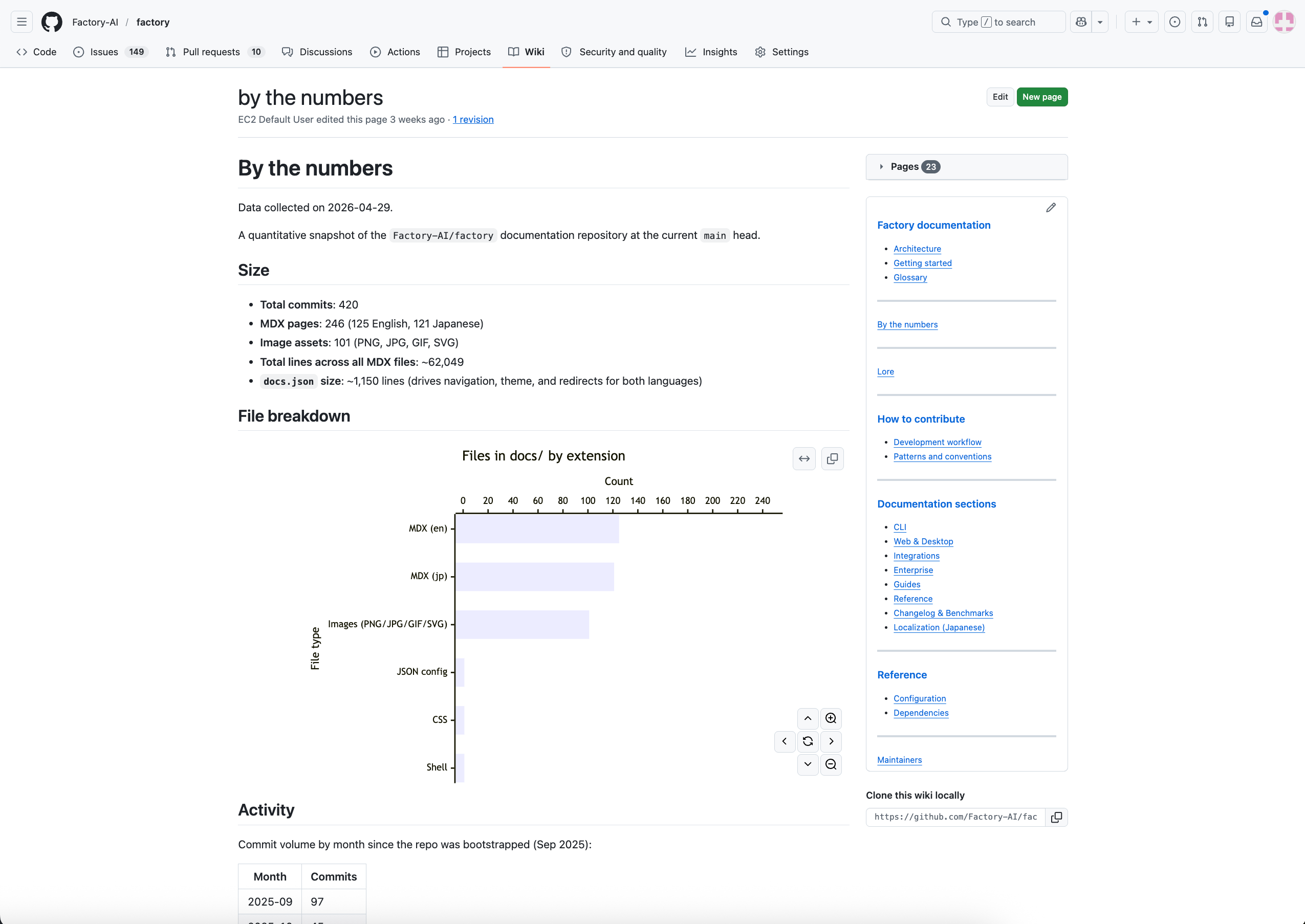 * Flattens the hierarchical page tree into GitHub Wiki's flat format (e.g., `overview/architecture.md` becomes `overview--architecture.md`)
* Rewrites internal links to use the flat filenames
* Generates `_Sidebar.md` with a navigable table of contents
* Generates `Home.md` from your Wiki root page
* Clones `{repo}.wiki.git`, replaces all content, and pushes
### Prerequisites for GitHub sync
* Your repository must be hosted on GitHub
* GitHub Wiki must be initialized -- if you've never used it, create the first page at `https://github.com/{owner}/{repo}/wiki`
* Your Git credentials must have push access to the GitHub Wiki repository
* [AutoWiki Cloud Sync](/cli/features/wiki/overview#autowiki-cloud-sync) must not be disabled for your organization
If GitHub Wiki isn't initialized, the Droid CLI prints a message with a link to create the first page and skips the sync without failing.
## Versioning
Each Wiki generation creates a new **Wiki Run** with metadata including:
* Commit hash and branch name
* Whether there were local uncommitted changes
* Droid CLI version used
* Timestamp
You can browse previous versions from the [AutoWiki page in the Factory App](/cli/features/wiki/web-viewer) using the version dropdown.
## See also
* [Set up AutoWiki refresh](/cli/features/wiki/auto-refresh) -- Keep Wikis current with a CI action
* [Browse Wikis](/cli/features/wiki/web-viewer) -- Read, search, and export Wikis from the Factory App
* [AutoWiki overview](/cli/features/wiki/overview) -- How all the pieces fit together
* Flattens the hierarchical page tree into GitHub Wiki's flat format (e.g., `overview/architecture.md` becomes `overview--architecture.md`)
* Rewrites internal links to use the flat filenames
* Generates `_Sidebar.md` with a navigable table of contents
* Generates `Home.md` from your Wiki root page
* Clones `{repo}.wiki.git`, replaces all content, and pushes
### Prerequisites for GitHub sync
* Your repository must be hosted on GitHub
* GitHub Wiki must be initialized -- if you've never used it, create the first page at `https://github.com/{owner}/{repo}/wiki`
* Your Git credentials must have push access to the GitHub Wiki repository
* [AutoWiki Cloud Sync](/cli/features/wiki/overview#autowiki-cloud-sync) must not be disabled for your organization
If GitHub Wiki isn't initialized, the Droid CLI prints a message with a link to create the first page and skips the sync without failing.
## Versioning
Each Wiki generation creates a new **Wiki Run** with metadata including:
* Commit hash and branch name
* Whether there were local uncommitted changes
* Droid CLI version used
* Timestamp
You can browse previous versions from the [AutoWiki page in the Factory App](/cli/features/wiki/web-viewer) using the version dropdown.
## See also
* [Set up AutoWiki refresh](/cli/features/wiki/auto-refresh) -- Keep Wikis current with a CI action
* [Browse Wikis](/cli/features/wiki/web-viewer) -- Read, search, and export Wikis from the Factory App
* [AutoWiki overview](/cli/features/wiki/overview) -- How all the pieces fit together